
FlowMail 26.1 is on the Mac App Store. It is a Kanban email client for Mac: one inbox drawn three ways — as a list, as a board, and as a graph of who replied to what — with its AI running on your own machine rather than on somebody else’s server. Free to download, macOS 15.6 or later.
Three views, one inbox
The premise is that an inbox is not one shape. Sometimes you want the list, because you are reading. Sometimes you want to see what you have actually committed to, which is a board. And occasionally a thread has grown twenty messages and four participants, and what you want is to see its shape.
So the same mail is drawn three ways, and the toolbar switches between them. Nothing is moved or copied to do it — it is one set of messages under three renderings.
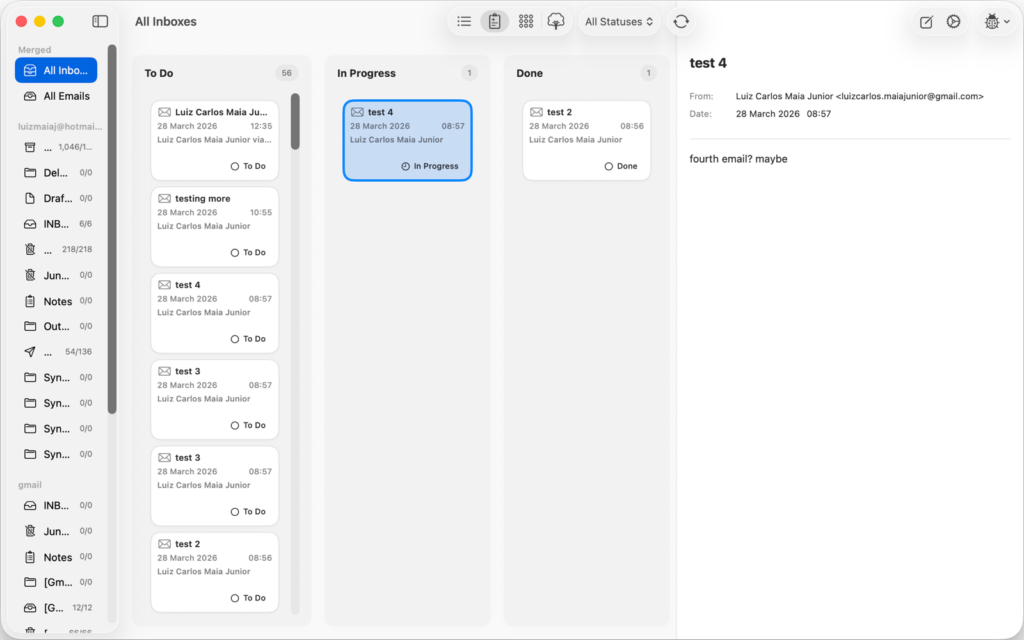
The board has three columns, and that is on purpose for now
To Do, In Progress, Done. A message lands in To Do and you drag it rightwards as you deal with it, which is the same gesture you already make in every project tool you use.
Being straight about the limit: in 26.1 those three columns are what you get. Settings lets you recolour them, and that is all it lets you do. Renaming and adding columns are not in this release — the board’s job right now is to be the fastest possible triage, and three columns is the version of that which needs no setting up.
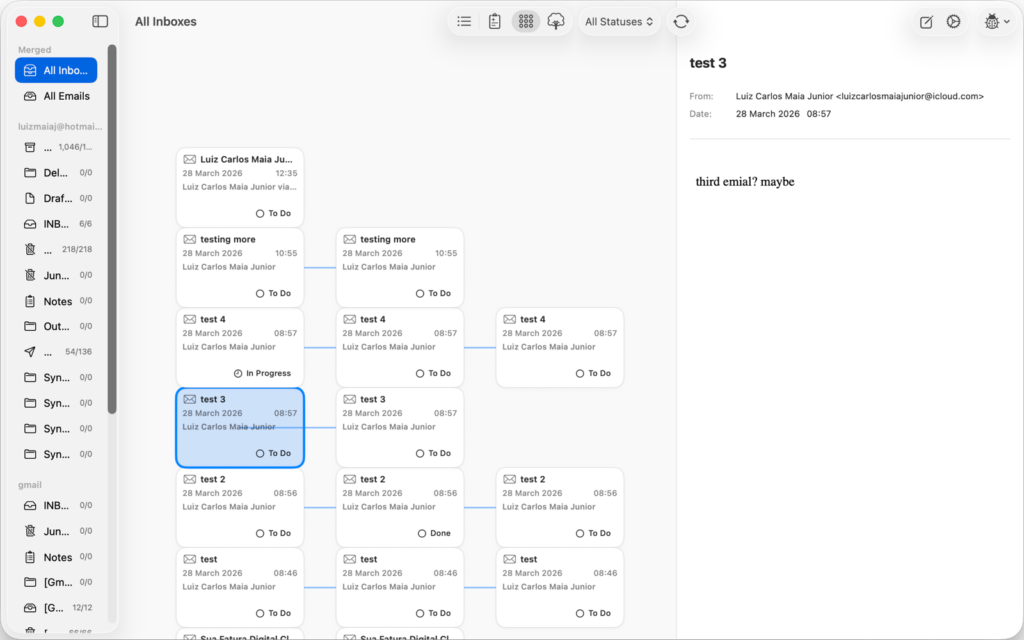
The graph is for the threads that got out of hand
Every message is a node, every reply is a line back to the message it answers. A long thread stops being a wall of quoted text and becomes something you can look at: who is actually talking to whom, where the conversation forked, which branch died.
What changed in 26.1
- The automation engine was rebuilt. Workflow steps and the system integrations around them were overhauled, which is the unglamorous half of this release and the half everything else depends on.
- Workflows gained data actions and better context handling. A step can now read and change FlowMail’s own mail — query the inbox, move a card, apply or remove a label — and pass what it found to the next step as a variable.
- Layout stability in the graph views. Plus general interface and performance work across the app.
- vCard and iCalendar files. FlowMail now reads and writes standard
.vcfand.icsattachments rather than treating them as opaque blobs.
The AI runs on your Mac, on a model you chose
There is no API key to paste, no account to create, and no request leaving your machine to make any of it work. FlowMail uses Apple’s MLX to run a language model locally, and the model is one you pick and download yourself in Settings:
- Qwen3 4B Instruct — about 2.4 GB, and the default
- Llama 3.2 3B Instruct — about 1.8 GB
- Qwen3 1.7B — about 1.0 GB
- Llama 3.2 1B Instruct — about 0.7 GB
Two honest caveats. On-device inference is Apple Silicon only — on an Intel Mac the rest of FlowMail works and the AI steps do not. And nothing happens until you download a model, because none is bundled: a 2.4 GB download inside a 10 MB app would be a strange thing to force on someone who only wanted a mail client. There is a single switch in Settings to turn the whole thing off.
The list is deliberately short, too. It holds the models whose architectures the shipped MLX runtime actually supports, so nothing in the picker fails to load after you have waited for the download.
It writes drafts. It does not send them
A workflow can compose a reply for you. What it then does is save that reply into Drafts, addressed to the original sender and threaded to the message it answers, and stop. One limit worth knowing in 26.1: that draft is written to Drafts on this Mac. Pushing it up to your mail server, so it also appears in Drafts on your phone, is a follow-up rather than something this version does.
There is no configuration that makes it send. An automation that mails people on your behalf while you are not watching is a bad idea however good the model is, and the failure mode is one you cannot take back — so the send button stays where it has always been, under your finger.
What a workflow can actually do
A workflow is an ordered list of steps. Each step is either a prompt to the local model or one of these built-in functions, and each can hand its output to the next as a named variable:
- Query emails — search your inbox by subject, sender or body
- Summarize and Classify — run text through the on-device model
- Draft reply — write to Drafts, as above
- Set Kanban status, apply label, remove label — move the mail around
- Web search and URL content — pull something in from outside
- Call MCP tool — see below
A workflow step can call an MCP tool
This is the part we are least able to be modest about. FlowMail speaks the Model Context Protocol: you add your own MCP servers in Settings, their credentials go in the Keychain, and a workflow step can then call any tool those servers expose, with arguments built from the email it is running on.
Which means the rule “when an invoice arrives, file it in the system that tracks invoices” is a three-step workflow rather than a feature request. Your mail client can reach the tools you already run.
Siri, Spotlight and Shortcuts, without setting anything up
Installing FlowMail publishes its actions to Shortcuts, Spotlight and Siri automatically. “Run my FlowMail workflow” works out of the box, as do composing an email, moving a message between columns, archiving, and marking read or unread. Behind those are the finer-grained intents — find emails, read an email’s details, apply or remove a label — for building your own shortcuts.
Where your mail actually lives
On your Mac, in a local SwiftData store. FlowMail has no server of its own — there is no red8.io account, and nothing about your mail is relayed through us, because there is no “through us” for it to pass.
Accounts connect the ordinary way: Microsoft (Outlook and Office 365) and Google (Gmail) over OAuth2, so your password is never typed into FlowMail; iCloud, Yahoo and Fastmail over standard IMAP and SMTP. The FlowMail privacy policy has the detail.
What is free and what is Pro
The app is free to download, and the two views you will live in — the list and the Kanban board — are free and stay free. So is running the local model: Prompt, Summarize and Draft Reply steps all work without paying anything, as does your first workflow.
FlowMail Pro adds the conversation graph, the thread tree, unlimited workflows, and the AI Classify step that sorts mail into categories for you. It comes as a monthly or annual subscription, or as a one-time lifetime unlock — current prices are on the App Store listing.
What you need
- macOS 15.6 or later. FlowMail was a Mac app in 26.1. Update, 24 Sep 2026: since 26.2 it is on iPhone and iPad too — see FlowMail 26.2.
- Apple Silicon, for the AI steps only. Everything else runs on any supported Mac.
- Disk space for a model, between 0.7 and 2.4 GB, and only if you want the AI.
More
- FlowMail — the product page, and the App Store link
- FlowMail FAQ — accounts, syncing and what the AI will and will not touch
- FlowMail support — if any of the above is not behaving as described