
Category: slotho

Every slotho release and write-up in one place — the daily balance score, food logging, fasting, sleep and Apple Watch, for iPhone and Apple Watch.

  • How slotho’s Ask Your History answers from your own logs

    How slotho’s Ask Your History answers from your own logs

    With Ask Your History in slotho 26.6, you can ask about your own health log in your own words, such as “When did I last eat salmon?”, and get a short answer. We built it so your iPhone does the looking, and only what answers your question is shared. Here is how it works.

    How Ask Your History works

    • slotho works out what you’re asking: which days, and whether it’s about meals, drinks, symptoms, mood, fullness, workouts, sleep or weight.
    • Your iPhone looks through your log and does the counting itself: how many times, on which days, the first and the last, and totals and averages. So the numbers in an answer are exact, not guessed.
    • slotho writes a short answer from what it found, in a few sentences, and lists every matching entry underneath so you can check it against your log.

    Only what answers your question is shared

    A question about salmon shares your salmon meals, not a year of everything you ate: at most ten entries, and the totals. With Apple Intelligence, on iPhones that have it, nothing leaves your iPhone at all. Otherwise, slotho asks you before your first question leaves your iPhone. The slotho privacy policy says what each feature shares, and where.

    It tells you what you logged, not what it means

    Ask “Why did I get headaches last week?” and you’ll see what you logged around them: the dates, what you ate before and how you slept. slotho is built to answer with what your log shows, and not to say one thing caused another, name a condition or tell you what to avoid. The matching entries are always listed, so you can draw your own conclusions or take them to your dietitian.

    Questions you can ask

    Ask the way you would ask a friend; there is no special format to learn. A few that work well:

    • “When did I last eat salmon?”
    • “How many coffees did I have last week?”
    • “How much water did I drink on Saturday?”
    • “What did I eat before my headaches last week?”
    • “When did I last do a strength workout?”
    • “How did I sleep last week?”
    • “What was my average weight this month?”

    Answers are best when you name a food, drink or workout the way you logged it, and when you say which days you mean, such as “last week” or “in October”. If you don’t name any days, slotho looks at the last 30. Ask Your History reads meals, drinks, symptoms, mood, fullness, workouts, sleep and weight, so a question about something slotho doesn’t record, such as your steps, won’t find anything. If nothing matches, you’ll see that straight away, and no entries are shared.

    Free, and with PRO

    • Free with Apple Intelligence or a key of your own, over the last 31 days.
    • With slotho PRO, over your whole history, for up to 3 of PRO’s 1,000 monthly credits a question.

    A suggested question from Insights costs only 2 credits on PRO, because slotho already knows what to look for. And asking never changes anything: Ask Your History only reads your log, and nothing in slotho or Apple Health is edited.

    Where to find it

    Open Me and tap Ask Your History, beside the new reports for your dietitian and your trainer. Insights also suggests questions about what it found, which you can ask with one tap.

    More

    slotho supports general wellness. It is not a medical device, and its answers are not medical advice.
  • Nutri-Score, NOVA and additives, in plain English

    Nutri-Score, NOVA and additives, in plain English

    Some foods in slotho carry two small badges: a letter from A to E, and a number from 1 to 4. Plenty of foods carry neither, which is the first thing worth explaining. They look like two versions of the same verdict. They are not. One is about what is in the food; the other is about what was done to it — and a food can score well on one and badly on the other without either being wrong.

    They come from Open Food Facts, and slotho searches three other food databases besides it — so whether you see them at all depends on which one your result came from. Here is what each badge measures, why a row often has none, and the one score you can sort by but never see.

    Nutri-Score: the letter, A to E

    Nutri-Score grades a food’s nutritional composition per 100 g or 100 ml. Points are counted against it for energy, sugars, saturated fat and salt, and counted back in its favour for fibre, protein and fruit, vegetables and legumes. The balance lands on a letter: A is the better end, E the worse.

    The algorithm was revised by a European scientific committee and the new version took effect on 1 January 2024, with a transition period that ran to the end of 2025 — so the grades you see now are the updated ones. The revision was stricter about sugar, salt and sweeteners, kinder to protein and fibre, and moved nuts and seeds out of the fruit-and-vegetables component. One consequence is easy to state and slightly startling: among drinks, only water can still score an A.

    What the letter does not tell you is whether the food suits you. It is computed per 100 g against a general population, not against your day, your targets or your medical situation. A food that is an E in the abstract can be entirely reasonable in the quantity you actually ate.

    NOVA: the number, 1 to 4

    NOVA ignores nutrition entirely. It classifies a food by how much industrial processing it has been through, in four groups:

    • 1 — unprocessed or minimally processed. An apple. Plain rice. Milk.
    • 2 — processed culinary ingredients. Oil, butter, sugar, salt: things you cook with rather than eat alone.
    • 3 — processed foods. Group 1 plus group 2, and not much else. Tinned beans, bread, cheese.
    • 4 — ultra-processed. Formulations built largely from substances not used in home cooking: protein isolates, modified starches, emulsifiers, colourings, sweeteners.

    A NOVA 4 is not automatically nutritionally bad, and a NOVA 1 is not automatically good — butter is group 2 and no one would call it a health food on that basis.

    Why they disagree, and why that is the useful part

    This is the whole reason slotho shows both rather than picking one.

    A diet drink can be reformulated into a good Nutri-Score while remaining unambiguously ultra-processed. A wholemeal loaf with a long ingredient list can be NOVA 4 and still be a sensible thing to eat. The two systems are measuring two distinct dimensions of the same food, which is exactly what a 2024 study of the revised algorithm concluded — the update made them more coherent with one another without making either redundant.

    If the two badges ever make you look at an ingredient list you would otherwise have skipped, they have done their job. Collapsing them into a single number would remove precisely the information that makes them worth showing.

    The third badge: additives

    Alongside the letter and the number, a food may carry a small count of additives. Tap through to the product detail and slotho lists them individually as E-numbers — the raw data arrives as tags like en:e330 and is displayed as E330.

    It is a count, not a verdict. E330 is citric acid. The chip tells you how many there are and lets you go and look; it does not tell you that any of them is a problem, because that is not a judgement a food log is in a position to make.

    Eco-Score: you can sort by it, you will not see it

    Worth being straight about, because Eco-Score comes up alongside the other two often enough that its absence looks like an oversight.

    Eco-Score rates environmental impact rather than nutrition or processing. In slotho it exists only as a way to sort search results. It is not stored on a food, it is not shown as a badge, and it is not saved against anything you log — unlike Nutri-Score, NOVA and the additive count, which are all written onto the entry so your history keeps them.

    That is a deliberate gap rather than a hidden feature: showing a badge implies we stand behind the number, and this one is not carried consistently enough across the database to stand behind yet.

    Where the numbers come from — and why a food often has none

    slotho does not compute any of these itself. They come with the food record, from Open Food Facts — a public, crowdsourced database. Which explains the thing people notice first: plenty of foods have no badges at all.

    slotho searches four sources — Open Food Facts, the USDA’s FoodData Central, FatSecret, and foods you created yourself — and only Open Food Facts carries these three scores. A barcode scanned off a European packet usually has all of them. A generic ingredient that came back from one of the other three has none, because the scores were never part of that record to begin with.

    There is a way to tell at a glance. Every row carries a small coloured source chip: OFF, FDC, FatSecret or Local. If it does not say OFF, that row will never show a Nutri-Score or a NOVA number, however well known the food is. When slotho has two records for the same food from different sources, it fills the gaps from whichever one has the data — a record with no grade can inherit one from its twin rather than showing a blank.

    And a missing badge means unknown, never bad. slotho hides the placeholder rather than showing an empty grade, for the same reason the daily balance score treats an unlogged meal as a gap instead of a zero — a blank is information about the database, not about your food.

    What slotho deliberately does not do with them

    None of these scores feeds your daily balance. None of them produces a warning, a nudge or a streak you can break. There is no screen that adds up your week’s NOVA 4s and has an opinion about it.

    They are labels on a food, shown at the moment you are choosing it, and then recorded so your history is honest about what you logged. What you do with them is the part we have no business automating.

    More

    Nutri-Score, NOVA and Eco-Score are third-party systems, not ours, and none of this is medical or dietary advice. slotho is free on the App Store for iPhone, iPad and Apple Watch, with two weeks of Pro included.

  • How the daily balance score works — and the things it deliberately won’t do

    How the daily balance score works — and the things it deliberately won’t do

    The daily balance score in slotho is one number out of 100, built from three things: sleep, nutrition and activity. That part is easy to describe. The more interesting half is what it refuses to do — because most of the design decisions in it are refusals, and they are the reason the number is worth looking at.

    The three factors in the daily balance score

    • Sleep — last night’s duration against your sleep target.
    • Nutrition — food and water together, because “did I fuel myself well today” is both of them, and one honest bar reads better than two half-empty ones.
    • Activity — active energy against your movement target.

    Each is scored 0–100 on its own, and the overall number is the average of them. The band underneath is plain language rather than a colour alone: 80–100 on track, 50–79 mixed, below 50 needs attention.

    Refusal one: a blank is a gap, not a zero

    This is the one that matters most. If you did not log any food today, the nutrition factor does not score zero — it scores nothing, shows a dash, and drops out of the average entirely.

    The alternative is what a lot of trackers do: treat an empty field as a failure, and hand you a 33 for a day in which you slept well, moved plenty, and simply did not feel like typing your lunch in. That number is not information about your day. It is information about your logging, dressed up as information about your day.

    When only some factors have data the card says so directly — it reads “N of 3 factors” rather than “out of 100”, so a partial score is never mistaken for a complete one. And if nothing at all has been recorded, there is no score, because there is nothing to score.

    Refusal two: it won’t judge your morning by the whole day’s target

    An early version of this card had a real flaw. You would eat a sensible breakfast at nine in the morning, open slotho, and see 20 out of 100 — because 400 calories is indeed miles short of a 2,000 calorie goal. Technically true, completely useless, and quietly insulting at breakfast.

    So targets are now pro-rated by how much of your waking day has actually elapsed. At 09:00 you are not expected to have eaten a day’s food. A sensible breakfast reads as on pace, and scores accordingly.

    The waking day defaults to 07:00–22:00, not midnight to midnight — nobody should be judged for not having eaten a third of their calories by 08:00 just because a third of the clock has gone. And it is only a default: it is your waking day, so you can move it.

    At the end of the day the pro-rating reduces to exactly the original curve, so a finished day is scored the same way it always was. The maths only bends while the day is still running.

    Refusal three: it won’t let basal metabolism flatter you

    The activity factor uses active energy only — the calories you burned by moving — not total expenditure. Total energy includes the very large number of calories your body spends keeping you alive while you sit still, and counting those would mean the score rises steadily through a day spent entirely on the sofa.

    A score that goes up when you do nothing is not measuring anything.

    Refusal four: it won’t treat every overshoot the same

    The three factors are deliberately asymmetric, because the things they measure are:

    • Calories over the goal are penalised at any hour, measured against the full goal rather than the pro-rated one. Eating tomorrow’s calories by lunchtime is not “ahead of pace”.
    • Water has no overshoot penalty at all. Drinking more than your target is not a failure, unlike overeating, so the water score simply caps at 100.
    • Sleep is a band, not a point. Full marks anywhere inside an hour either side of your target — with the default 8-hour target, that is anything from 7 to 9 hours — falling off in a straight line to zero three hours outside the band. An ordinary night scores full rather than being docked for being eleven minutes short.

    Sleep is also the one factor that is never pro-rated. Last night is already over by the time today starts; there is nothing provisional about it.

    It knows when it is guessing

    While the day is still running, the score is a running read against pro-rated targets, and it can still move. The card labels that state “So far today”, so a mid-afternoon number is never presented as a final verdict on the day.

    It recomputes every minute, so the pace-adjusted number keeps up rather than going stale in your hand.

    If you work nights

    The waking day can wrap past midnight. Set it to 22:00–06:00 and a shift that starts on Tuesday evening and ends on Wednesday morning is scored as one day — the day it ends on, rather than being sliced in half by the calendar and scored as two bad ones.

    Your targets, not ours

    All four targets behind the score — sleep, calories, water and movement — are yours to set. The defaults are only defaults, and changing one re-scores your history against the new number rather than leaving old scores sitting next to a target they were never judged against.

    Tapping the card opens the last month, scored by exactly the same rules, so “how am I doing lately” has an answer that is consistent with today’s.

    What it is not

    It is not a health metric, and it is written that way on purpose. It carries no medical framing and makes no claim about your health. What it summarises is narrower and more honest: how close to your own sensible targets was today.

    The whole thing is computed on your device from data already in Apple Health. Nothing about your day is sent anywhere to produce it — see the slotho privacy policy for the detail. The daily balance card is part of slotho Pro.

    More

    • slotho — food, water, caffeine, sleep, workouts and fasting, in Apple Health
    • slotho FAQ — including what the score needs before it will show you a figure
    • slotho support — if the card is not behaving the way this describes
  • slotho – 2.4.0 workout notes

    slotho – 2.4.0 workout notes

    🏋 After seeing the sad look on our trainer’s eyes 🥺 we decided to cheat.

    Introducing, workout notes 📒, your cheat sheet on your wrist, never disappoint your trainer ever again.

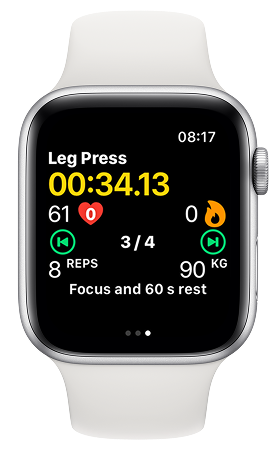
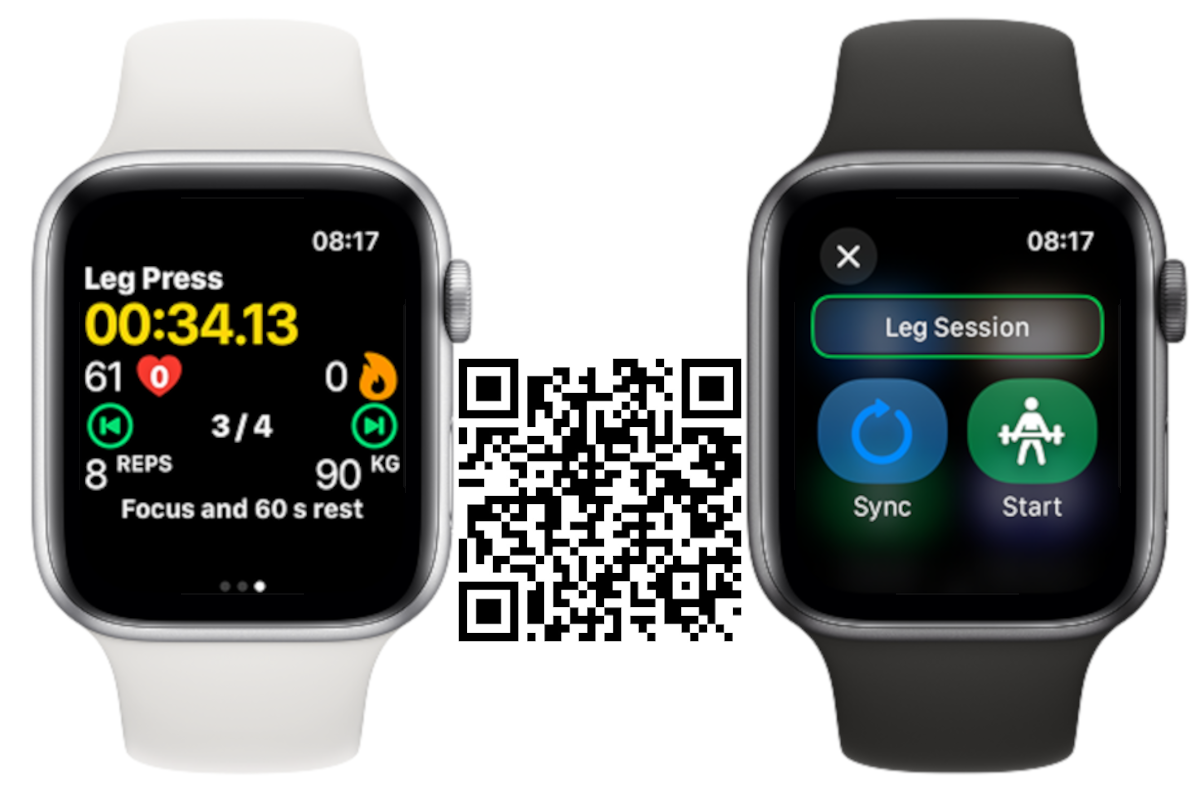
    An Apple Watch running slotho's strength workout: Leg Press, a timer at 00:34.13, heart rate 61, set 3 of 4, 8 reps at 90 kg, and the note "Focus and 60 s rest"

    iPhone:

    CHANGED: Workout notes added to the workout plan view.

    Apple Watch:

    CHANGED: Under the hood optimisations for the workout view.

    NEW: Workout notes added, for more complex workout series.

    CHANGED: Small tweaks to the action buttons to make their sizes more consistent.

    FIXED: Load unit was displaying kg even though lb was selected.

    FIXED: Compatibility issue with WatchOS 10 and below for the workout sync button.

    CHANGED: Workout view organisation to better fit the notes at the bottom.

    Download now

  • slotho – 2.3.0 workout plan

    slotho – 2.3.0 workout plan

    🏋We have been training and we are now introducing workout plans.
    From phone to watch, an easy way to track your strength training.
    It’s just the beginning for workout tracking in slotho and there’s a lot more coming.

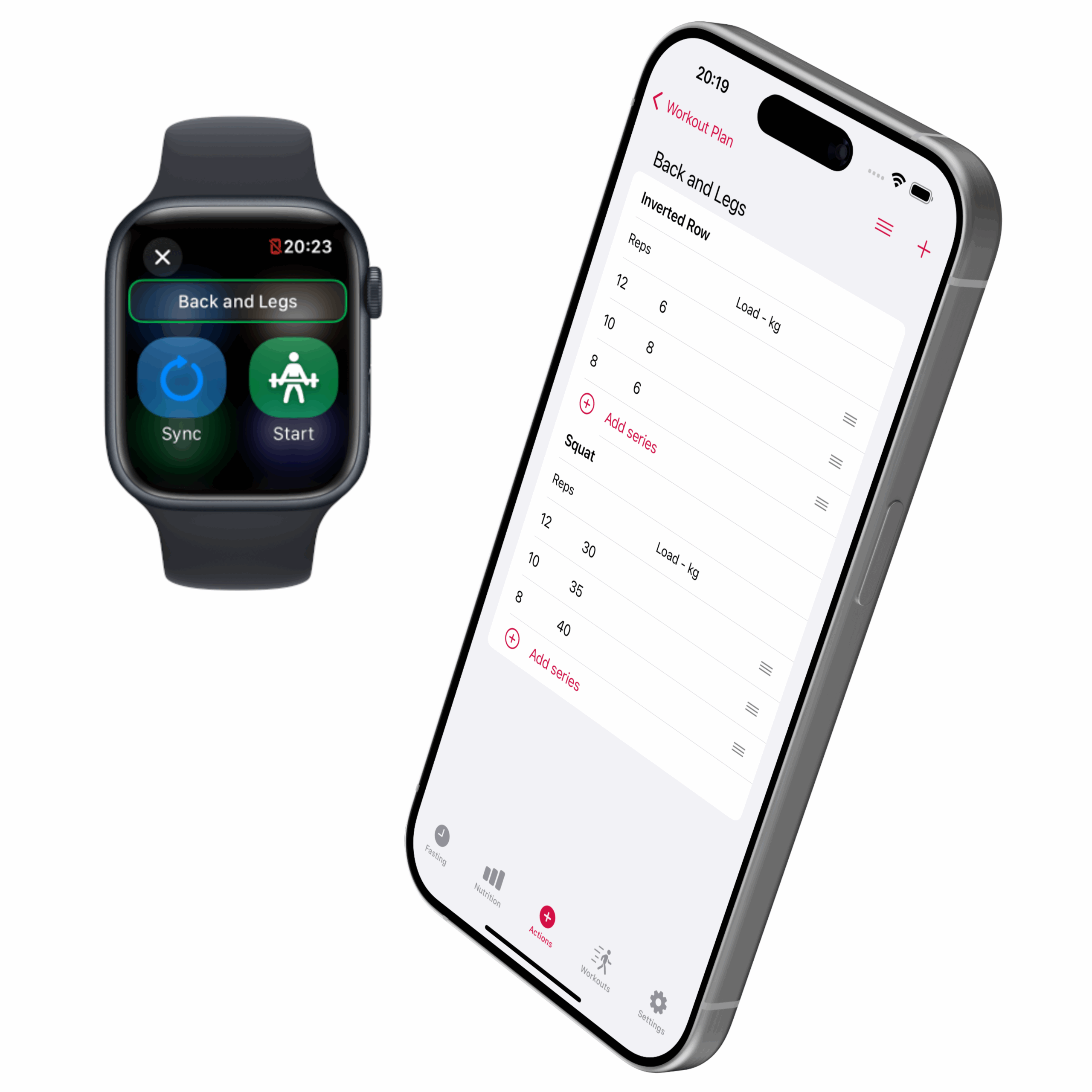
    slotho workout plan screen

    iPhone:

    • NEW: Workout plan, build your weight training plan on the phone and then track it on the Apple Watch.

    Apple Watch:

    • CHANGE: Buttons’ design to smaller sizes and different colours.
    • NEW: Track your weight training session with the exercise list with repetitions and loads.

    Download now

    slotho App Store download QR code
  • slotho – 2.2.4 favourite images

    slotho – 2.2.4 favourite images

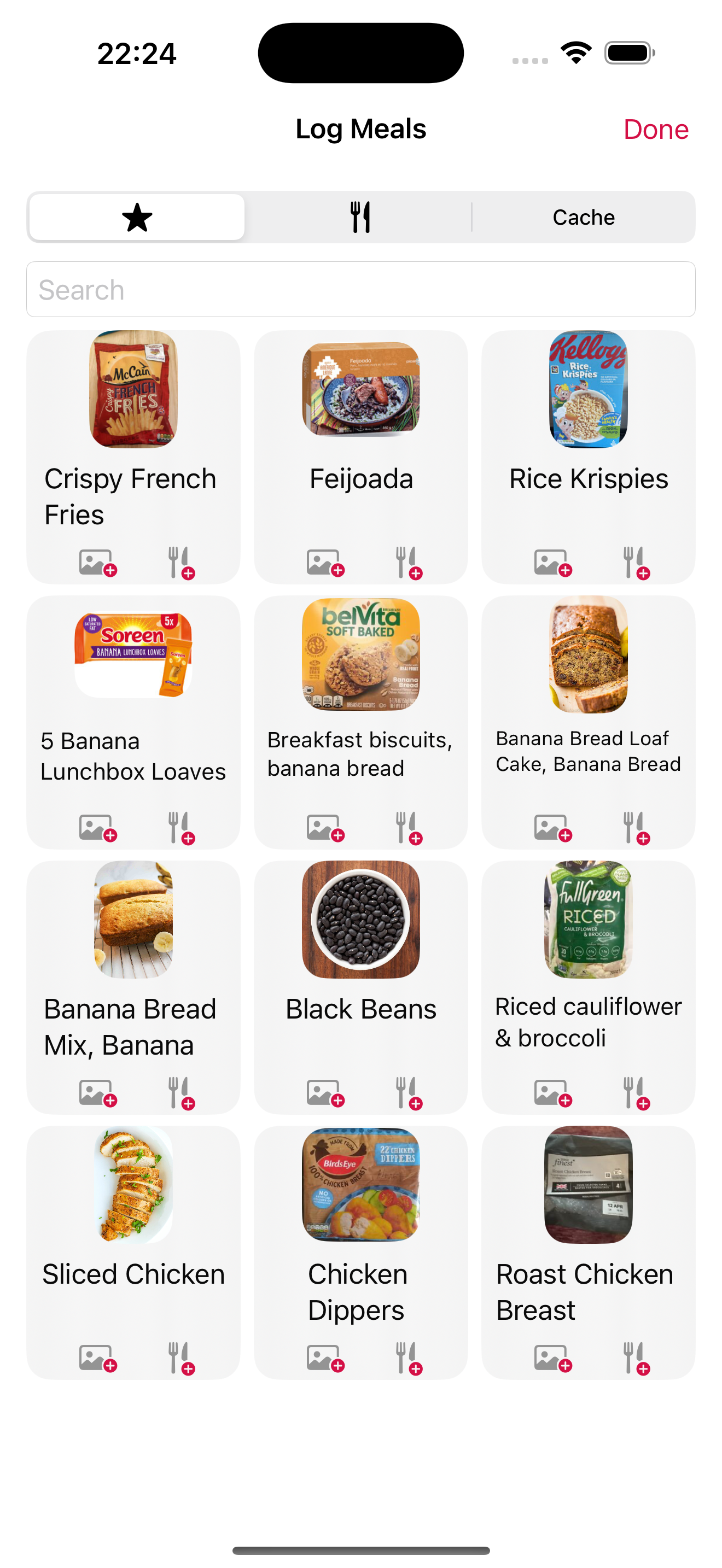
    slotho's Log Meals screen in light mode: a grid of saved foods with photos, including crispy French fries, feijoada, Rice Krispies, banana bread, black beans and roast chicken breast

    iPhone and iPad

    CHANGED: Some improvements in the Settings page to reorganise the items in a more logical order.

    NEW: Added the possibility to use a custom link to a favourite food image when the normal search returns no results.

    CHANGED: Optimised the spacing on the food quantity numbers for easier scrolling.

    CHANGED: Some labels that had redundant information.

    Download here

    slotho App Store download QR code
  • slotho – 2.2.3 apple watch weight logging improved

    slotho – 2.2.3 apple watch weight logging improved

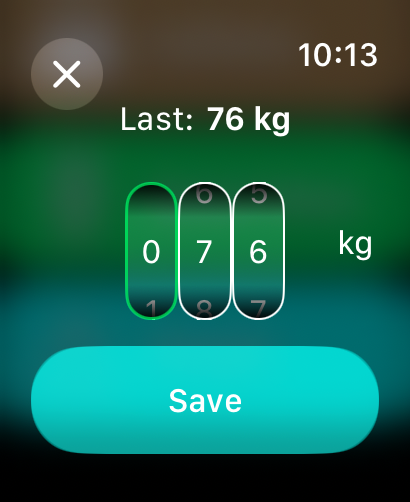
    An Apple Watch screen for logging body weight: the last entry was 76 kg, three digit wheels set to 076 kg, and a Save button

    iPhone and iPad:

    • NEW: filter by type in the history view

    Apple Watch:

    • FIX: the weight logger shows the last logged value when opened
    • CHANGE: the weight logger now uses number scrolling for each digit so the weight can be logged faster

    Photo by Graphic Node on Unsplash

  • slotho – 2.2.2 actions view refresh

    slotho – 2.2.2 actions view refresh

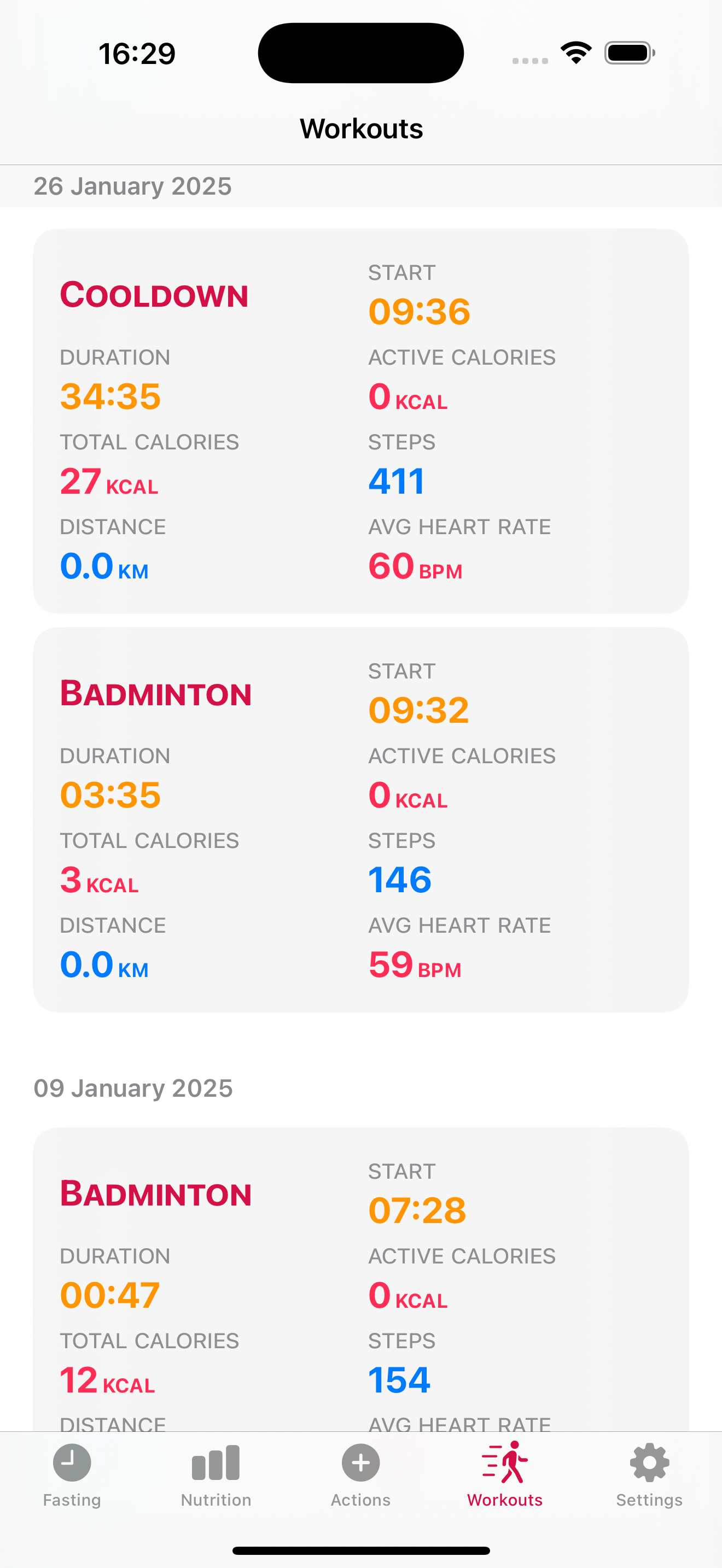
    slotho's Workouts list on iPhone: a cooldown and two badminton sessions, each with duration, start time, total and active calories, steps, distance and average heart rate

    iPhone and iPad:

    – CHANGED: added workout type to the workout details card

    – CHANGED: added refresh view to the actions list.

    Photo by Kumiko SHIMIZU on Unsplash

  • slotho – 2.2.0 current calories and water readily visible

    slotho – 2.2.0 current calories and water readily visible

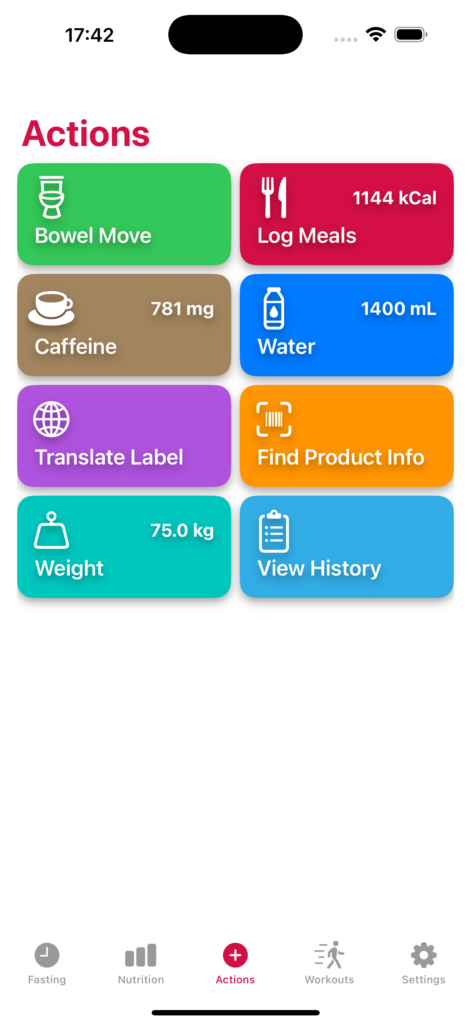
    The main change in this version is that on a continuous set of improvements to reduce the number of taps to use the app we are making the water, weight, calories and caffeine data immediately available on the actions screen so it’s visible when the app is launched.

    slotho's Actions screen on iPhone with tiles for Bowel Move, Log Meals (1144 kcal), Caffeine (781 mg), Water (1400 mL), Translate Label, Find Product Info, Weight (75.0 kg) and View History

    iPhone and iPad:

    – NEW: Added the current daily water, caffeine and calories intake that are now visible in the action buttons.

    – NEW: Added the current calorie intake to the food logging view so it’s visible alongside the new food being logged.

    – CHANGE: Interface changes on the Action buttons for better display across different screen sizes.

    – CHANGE: Improvements on the product detail view.

    – CHANGE: Improvements for a more stable performance.

    Photo by Kouji Tsuru on Unsplash

  • slotho – 2.1.2 NOVA food processing classification

    slotho – 2.1.2 NOVA food processing classification

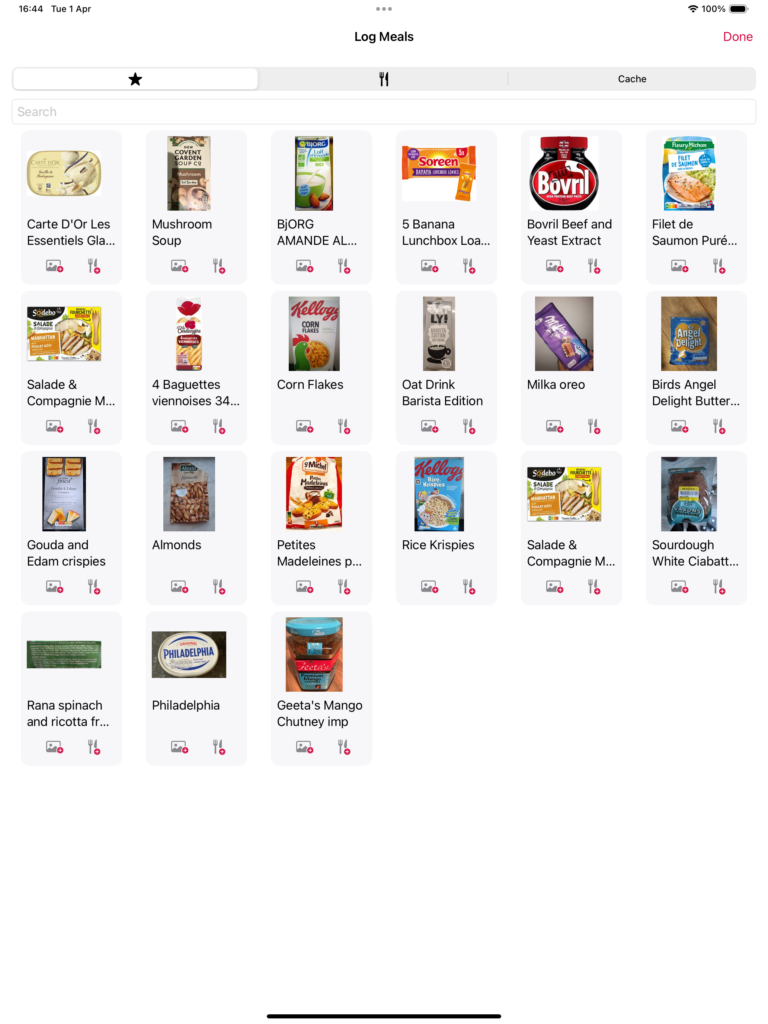
    slotho's Log Meals screen on iPad: a grid of saved foods with package photos, including mushroom soup, Bovril, Corn Flakes, almonds, Rice Krispies and Philadelphia

    iPhone and iPad:

    – NEW: Added the total amount of calories for the meal currently being logged.

    – CHANGE: Improved the editing experience on the food logger, date, quantity and food can be edited in the same place.

    – NEW: Added the NOVA group category display on the food cards.

    – CHANGE: under the hood work for consistency in how the views are displayed.

    Photo by Brooke Lark on Unsplash